
IBM SPSS Statistics 24
Out of stock

Dit product is niet meer te bestellen. IBM ondersteunt deze versie van SPSS Statistics niet meer. Je kunt hier een andere versie van SPSS bestellen >>.
-
Description
-
More Information
-
Instructions
-
Systemrequirements
-
Reviews
Description
IBM SPSS Statistics 24 is a program intended for advanced data analyses. Better access to programming extensions, smarter data management and improved productivity all mean that you can work more efficiently and get more comprehensive research results.
SPSS Statistics 24: New features
|
SPSS Statistics extensions: Discover the new extension centre, where you can install and update various extensions. Here, you can also access and work with open source and third-party programming extensions. Click 'read more' under the product description for more information on SPSS Statistics Extensions. |
 |
|
Smarter data management: A newly designed environment for importing and exporting the most popular file types. What is more, SPSS Statistics 24 also works better in combination with various Excel functions and options. Click 'read more' at the bottom of the product description for more information on smarter data-management options. |
 |
|
Improved productivity: New and improved functions in SPSS Custom Tables. New SPSS community for extensions, with forums where you can ask questions or join interesting discussions. Support for Python 3. New datetime formats. Click 'read more' at the bottom of the product description for more information on innovations for increasing productivity. |
 |
See below for an example of a statistical analysis in SPSS 24.
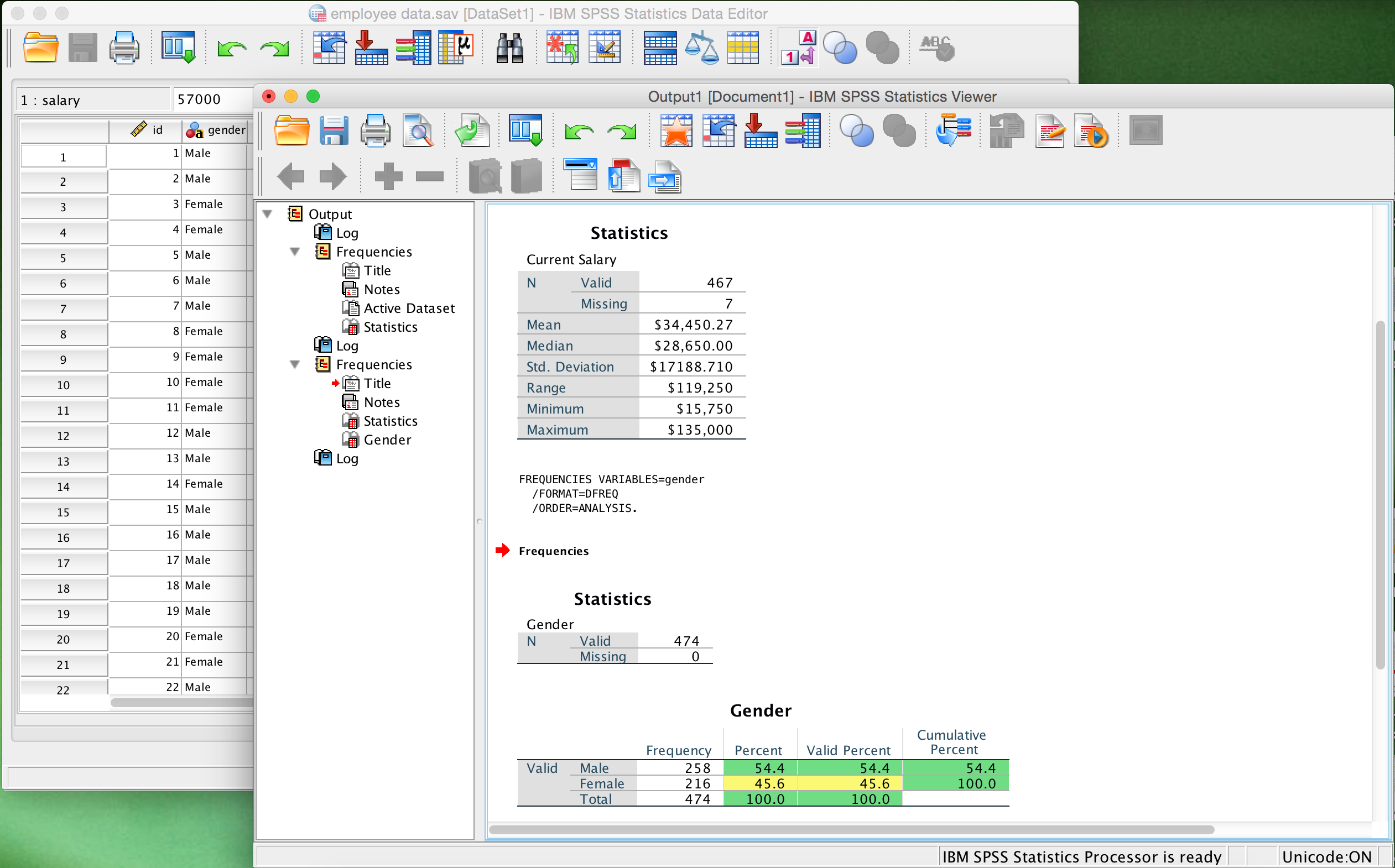
IBM SPSS Statistics in a nutshell:
SPSS Statistics is the world’s leading and most widely used statistics software for solving business problems and handling research projects. To give a few examples, you can use ad hoc analyses, hypothesis tests, spatial analyses and predictive analyses to make your research results as comprehensive as possible.
Use SPSS Statistics 24 for the following tasks:
Clarify large and complex data sets by using advanced statistical methods.
Obtain deeper insights from large, complex data sets and present your results with various types of visuals offered by SPSS in order to communicate results more clearly.
Process and implement analyses more quickly by using flexible implementation options.
Ensure that your company can respond proactively to future opportunities and threats so as to maximise your return on investment.
SPSS Statistics Extensions:
The new extension possibilities allow you to work with open source and programming extensions.
SPSS Statistics Extensions Hub is a new interface that enables you to manage extensions. It is a kind of online extensions shop where you can do things such as:
Brows, download and update free product extensions that are based on SPSS, Python or R syntax.
Update extensions that you already have.
Remove installed extensions.
View properties of your installed extensions.
With the SPSS Statistics Custom Dialog Builder for extensions, you can easily create and share extensions (based on R/Python and SPSS Syntax) which form a perfect match for your own needs.
Smarter data management:
IBM SPSS Statistics 24 has a newly designed environment for importing and exporting the most popular file types, and offers more effective calculation options for the various types of variables. Below, we set out a number of smart data management functions:
New options for importing and exporting Microsoft Excel and CSV files.
Select a data format for a column, based on specific value percentages.
Ignore hidden Excel rows and columns.
Remove spaces before and after series values.
Add a named worksheet to an Excel workbook.
Make variable labels instead of variable names.
Automatic data format detection and better representation of the date and time values.
Export value labels to a database.
Improved productivity:
New welcome screen with an introduction and information on, among other things, the community and the License Manager.
Multi-threading with other client computers.
Possibility to place zeros before the first number (leading zeros).
Variable pictograms in the Data Editor and a revamped Variable View screen.
Renewed and improved functions in SPSS Custom Tables, such as:
- Effective basis for weighted sample results.
- Many new reliability intervals and standard deviations.
- A new possibility for placing significant test results in the main table.
- The option to display significant values for column meanings/column relationships.
- An extra error correction method for multiple comparisons.
New SPSS community for extensions, with forums where you can ask questions or join interesting discussions.
Support for Python 3.
New datetime formats.
More Information
| Media | Download |
|---|---|
| Brand | SPSS (IBM) |
| Language | English |
| Special conditions | IBM SPSS Statistics 24 can and may be installed twice with the Authorisation Code supplied together with the program. The product can either be installed on two computers, or on one computer so that a reinstallation of IBM SPSS Statistics 24 can be performed at a later date. |
| Cooling-off period | Downloads form an exception under the law, and are not subject to a cooling-off period. |
| Terms of use |
Instructions
Mac: For a smooth installation of SPSS 24 for Mac use handleiding.
Windows: For a smooth installation of SPSS 24 for Windows use handleiding.
Systemrequirements
You can install SPSS 24 on the operating systems below.
Mac OS:
10.10, 10.11, and 10.12
Pay attention! 10.13 High Sierra, 10.14 Mojave.10.15 Catalina and Bigsur 11 are not supported.
Do you have 10.13 or 10.14? Then choose SPSS 25. Do you have 10.15? Then choose SPSS 26. If you have MacOS Bigsur 11.0, choose SPSS 27.
Windows:
Windows: 7, 8 and 10
Note: we cannot provide support if you are using Windows XP and Windows Vista.
When you work with an Experiabox, make sure you use 4G when authorizing SPSS 24.
This blocks certain connections that are required for authorization.

